
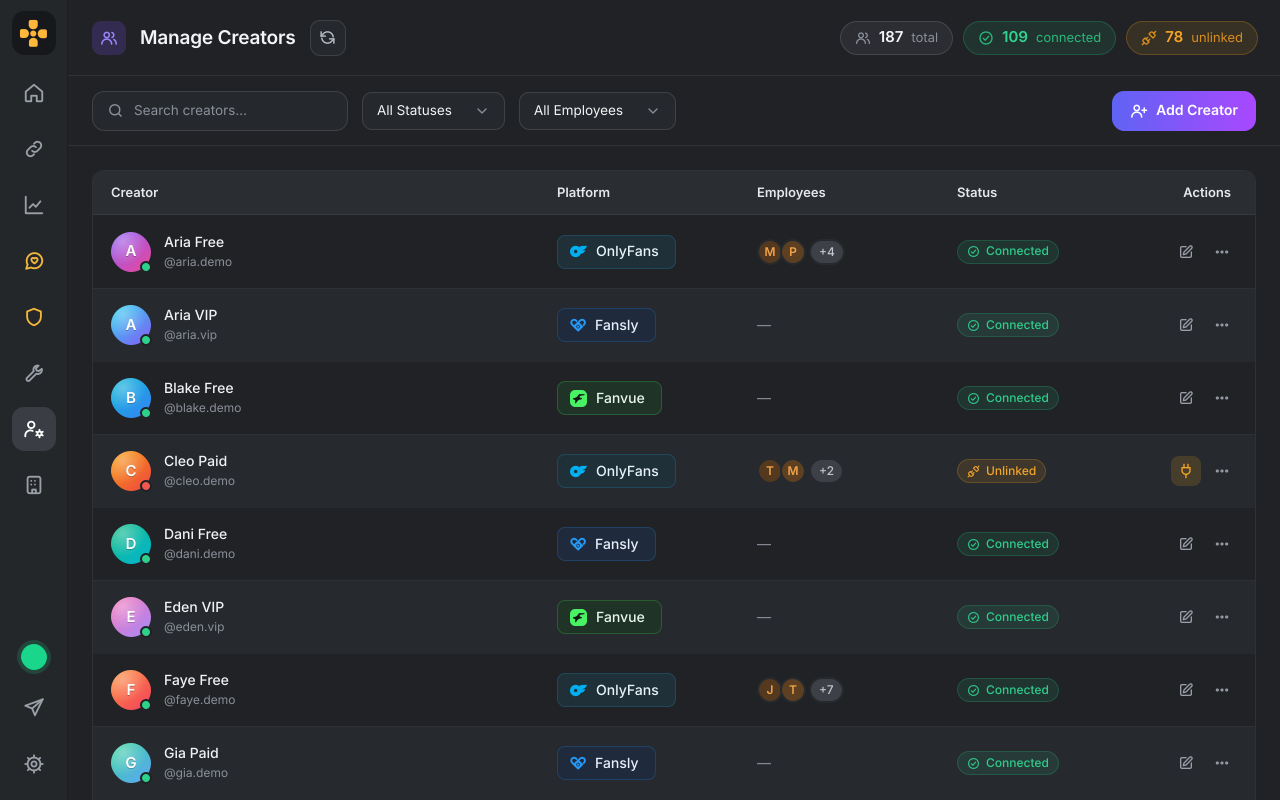
One creator list for all three
Switch platforms from the menu at the top left. Manage Creators lists your Fanvue creators next to your OnlyFans and Fansly ones, with the same search and status filters.
Your Fanvue creators open in the OFManager desktop app, beside your OnlyFans and Fansly ones. Each creator signs in once on Fanvue's own page. After that you work on Fanvue's real pages: Chats, Vault, Queue, Insights and the rest.
Switch platforms from the menu at the top left. Manage Creators lists your Fanvue creators next to your OnlyFans and Fansly ones, with the same search and status filters.
Each creator's real Fanvue pages open inside the desktop app: Chats, Vault, Queue, Insights, Tracking links and eight more, the way your team already knows them.
For now, the agency owner and staff with full creator access open Fanvue creators. Each Fanvue page still follows a staff permission: Chats and Mass messages follow Messages Basic, and Earnings & Payouts follows Statements.
You need to be the agency owner or have full creator access, and the creator needs to be there to sign in on Fanvue's own page. Fanvue publishes its own rules for agencies and manager accounts, so read Fanvue's help center and agency terms before you connect a creator. Read the full guide.
Fanvue is in the OFManager app for Windows and macOS. Download it or update the one you have.
Open Manage Creators, click Add Creator and pick Fanvue under "Which platform?".
Click Sign in to Fanvue. In the window that opens, the creator presses Continue to Fanvue, signs in on Fanvue's own page and presses Allow on Fanvue's screen. The login is typed on Fanvue's page, not into OFManager.
Click your avatar at the top left, choose Fanvue and pick the creator. Their Fanvue pages are in the menu on the left.
OFManager refuses these on Fanvue for everyone on your team, owners included. A page that is refused says it is not available in OFManager. You run the pages; the rest stays with the creator on Fanvue.
Guides for your team: getting set up, running each creator's Fanvue account, money and reporting, and choosing a tool.
Yes. Fanvue is in the OFManager desktop app for Windows and macOS. Connect a creator's Fanvue account once, and the agency owner and staff with full creator access open that creator's Fanvue pages inside OFManager, next to your OnlyFans and Fansly creators.
Yes. Switch between OnlyFans, Fansly and Fanvue from the menu at the top left of the app. Manage Creators lists your Fanvue creators beside your OnlyFans and Fansly ones, with the same search and status filters, so you run all three from one place.
Yes. A creator who signs up for OFManager owns her workspace, so she connects her own Fanvue account the same way and opens Fanvue's pages next to her OnlyFans account in the desktop app. OFManager's own fan CRM, mass messaging and analytics work on OnlyFans accounts.
For now, the agency owner and staff with full creator access can connect Fanvue creators and open their pages. Other staff don't see Fanvue in the app. Each person sees only the Fanvue pages their role allows: Chats and Mass messages follow the Messages Basic permission, Vault follows OF Vault, and Queue and Create Post follow New Post. Giving one chatter access to a single Fanvue creator is not available yet.
On Fanvue's own sign-in page. The agency owner, or someone with full creator access, chooses Add Creator, then Fanvue, then Sign in to Fanvue. In the window that opens, the creator presses Continue to Fanvue, signs in on Fanvue's page and presses Allow on Fanvue's screen, which names the OFManager app and the permissions it asks for. The login is typed on Fanvue's page, not into OFManager. If Fanvue stops accepting a creator's sign-in, their pages show "Sign in to Fanvue again" with a Relink button.
Thirteen of Fanvue's own pages: Home, Profile, Notifications, Chats, Mass messages, Vault, Queue, Insights, Lists, Tracking links, Earnings & Payouts, Create Post and Settings. Fanvue's Discover page is left out. Earnings & Payouts opens the earnings pages only, and some Settings pages stay closed.
OFManager's own tools, such as fan tags and spend in the CRM, mass messaging, tracking link reports and chatter analytics, work on OnlyFans accounts only. On Fanvue you use Fanvue's own Chats, Mass messages, Tracking links and Insights pages inside the app. The payout pages never open in OFManager, and a Fanvue account can be connected to one OFManager agency at a time.
No. OFManager is independent and is not affiliated with or endorsed by Fanvue. Fanvue publishes its own rules for agencies and manager accounts in its help center and agency terms. Read them before you connect a creator, because OFManager can't tell you what they allow for your agency.
Not yet. You can sign in as a team member who manages creators: OFManager lists the creators on that login and you tick the ones to add. They are added to your agency, but their Fanvue pages open only once each creator signs in with their own Fanvue login. Until then their pages say so and offer a Relink button.
Fanvue is in the OFManager desktop app for Windows and macOS. OFManager is not affiliated with or endorsed by Fanvue, Fansly or OnlyFans.